What Is a Thermal Receipt Printer?
At a busy checkout, a receipt must print quickly and clearly. A Thermal Receipt Printer does this by applying heat to specially coated paper, forming text without ink or toner. The printhead warms selected spots, and the coating darkens where heat touches it. Simple. Quiet. This design can reduce routine supply changes and help many point-of-sale counters keep queues moving. Still, the printer needs compatible paper, a clean printhead, and a connection suited to the register or tablet.
This guide explains how thermal printing works and where these printers are commonly used, from small cafés to retail counters. It also introduces direct thermal printing, the method used by most receipt printers, and distinguishes it from thermal transfer printing. Paper width, roll size, print speed, and available connections all affect whether a model fits a particular workspace. USB, Ethernet, Bluetooth, and Wi-Fi options are not interchangeable in every setup, so checking device compatibility matters. Print quality and easy paper loading matter, too, especially during a rush. Thermal receipts can fade after exposure to heat, sunlight, or friction, so they may not suit every record-keeping need. That limitation is easy to overlook. A printer that works well at the counter may not be the best choice for keeping receipts readable for years. The sections ahead cover the practical benefits, common limitations, and key features to compare before choosing a model.
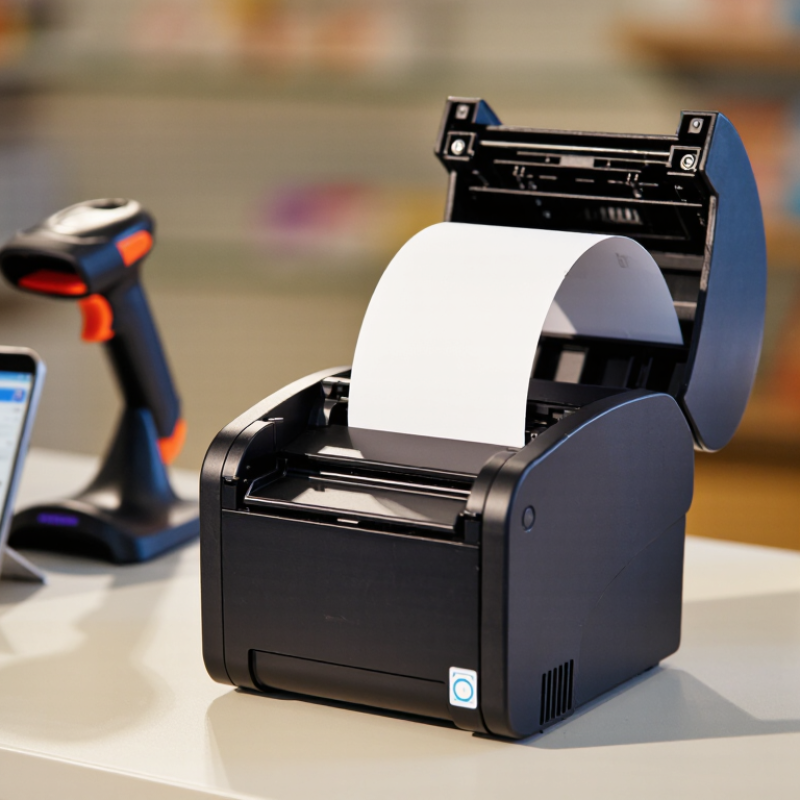
Definition and Core Purpose of a Thermal Receipt Printer
A thermal receipt printer creates text and simple graphics by applying controlled heat to coated paper. In a direct-thermal model, the printhead darkens the paper’s heat-sensitive layer. No ink or ribbon is needed. Its core purpose is to turn transaction details—items, prices, tax, and payment status—into a readable paper record at checkout.
The printer is a peripheral, not a payment terminal. Register or point-of-sale software prepares receipt data and sends it to the device. Thermal mechanisms are common at checkout because they print quietly and require few replaceable supplies. Worldpay’s Global Payments Report 2024 estimated that cash accounted for 16% of global in-person transaction value in 2023. That figure does not measure receipt printing, but it underscores the ongoing need for reliable transaction records across payment types.
The simple definition leaves out a weakness: heat-sensitive receipts can fade when exposed to heat, sunlight, friction, or time. Paper quality and storage affect legibility, so the printout is convenient, not permanent. “Maintenance-free” is too strong. Printheads and feed paths still need attention, and paper rolls need replacing.
What Is a Thermal Receipt Printer? - Definition and Core Purpose of a Thermal Receipt Printer
| Dimension | Description |
| Definition | A thermal receipt printer is a printer that produces text and graphics on paper using heat. Most receipt printers use the direct thermal method, which creates an image on heat-sensitive paper. |
| Core purpose | To print transaction records and other short documents quickly at the point of sale, such as customer receipts, order tickets, and payment confirmations. |
| How direct thermal printing works | A printhead contains small, electronically controlled heating elements. As the paper moves past the printhead, selected areas are heated and darken to form characters, barcodes, or images. |
| Main consumable | Heat-sensitive thermal paper, commonly supplied on rolls. The paper itself reacts to heat, so direct thermal printing does not require ink or toner. |
| Typical printed content | Items purchased, prices, tax, totals, date and time, payment details, store information, and machine-readable codes such as barcodes or QR codes, depending on the system and printer. |
| Common applications | Retail checkout counters, restaurants, ticketing, kiosks, delivery services, and other settings that need compact, on-demand transaction or order documents. |
| Typical advantages | Fast, quiet printing with a relatively simple paper path. Direct thermal models avoid ink and toner supplies, making them practical for frequent short-document printing. |
| Important limitation | Direct thermal print can fade over time, especially when exposed to heat, light, friction, or certain chemicals. It may be less suitable than other printing methods when long-term document readability is essential. |
| Thermal transfer distinction | Thermal transfer printing also uses a heated printhead, but transfers pigment from a ribbon onto the media. It is a different process from the direct thermal method commonly used for receipts. |
How Thermal Printing Produces Text and Images
A thermal receipt printer turns digital instructions into tiny marks on paper. In a common direct-thermal model, the printhead contains many small heating elements arranged in a line. As paper moves beneath them, selected elements heat specific spots. The paper has a heat-sensitive coating that darkens when warmed. Each spot becomes a dot, and rows of dots build letters, numbers, and simple graphics.
The printer controls which elements heat and for how long. Longer or stronger heating can create darker marks, while the paper’s movement determines where each row lands. Text is formed from dot patterns stored in the printer’s instructions. Images use the same process, often with patterns of dots to suggest different shades. The result is usually monochrome, not full color. One detail is easy to overlook: paper quality and print settings both affect sharpness. A faint receipt may not mean the printhead is failing.
Tips: Keep the printhead clean and use paper made for thermal printing. Store receipts away from heat and direct sunlight, since the coating can darken or fade. Small text can still look rough; thermal dots have limits.
Key Components and Types of Thermal Receipt Printers
A thermal receipt printer forms text and barcodes by heating paper, avoiding liquid ink. Its main parts are a thermal printhead, platen roller, controller board, paper sensor, and cutter. The printhead has tiny heating elements that darken coated paper in precise patterns. The roller keeps the paper moving evenly beneath it. The controller converts sales data into print signals, while sensors detect paper ends or jams. The cutter trims each receipt after printing. Small details matter: a dusty sensor or worn roller can cause faded lines or crooked output. The diagram looks simple. Shop floors are less tidy.
The two main printing methods are direct thermal and thermal transfer. Direct thermal uses heat-sensitive paper and is common for short-lived receipts. Thermal transfer heats a ribbon to move ink onto paper, supporting prints that need to last longer. Printers also vary by form: countertop units suit checkout lanes, mobile models fit handheld use, and kiosk printers sit inside self-service machines. Grand View Research’s 2024 Thermal Printer Market analysis estimated the global market at USD 4.3 billion in 2023, reflecting broad use across point-of-sale and other applications. That figure covers more than receipt printers, so it should not be read as a receipt-printer sales total. In practice, paper quality, print speed, and cutter durability often shape a buyer’s experience as much as the printer type.
Thermal Receipt Printer Types: Typical Print Speeds
Typical upper-end specifications vary by model: mobile printers are often around 100 mm/s, desktop models around 250 mm/s, and high-speed POS models around 350 mm/s. A thermal printhead heats coated paper against a platen roller; the controller manages the print job, and some printers include an automatic cutter.
Common Applications Across Industries
What Is a Thermal Receipt Printer?
Common Applications Across Industries
thermal receipt printers use heat to mark coated paper, avoiding ink cartridges and ribbons. Their speed and compact size suit busy counters. Retailers print purchase receipts, return slips, and pickup tickets, while restaurants send order chits to kitchen stations. In clinics, they can print payment receipts or queue tickets; patient labels require purpose-built label printers. Small details matter: a clear timestamp can help staff trace a transaction.
Use cases are expanding with high-volume commerce. The U.S. Census Bureau estimated fourth-quarter 2024 U.S. e-commerce sales at $308.9 billion, or 16.1% of retail sales. That environment makes pickup and return workflows important, though online sales do not automatically mean more printed receipts. The National Retail Federation’s 2024 Retail Returns report estimated that 16.9% of annual retail sales would be returned, worth about $890 billion. A receipt can make purchase lookup easier, but it is only one part of a reliable returns process. Paper can fade, jam, or run out. That happens.
Tips: Match printer width and speed to daily ticket volume. Test print legibility under store lighting, and keep spare paper rolls near the counter. For kitchens, check that prints remain readable around heat and handling. Don’t overlook routine cleaning.
Benefits, Limitations, and Maintenance Needs
Direct-thermal receipt printers create text by heating coated paper, so they need no ink or toner. That keeps counter clutter low. They are quiet, compact, and suited to fast checkout. Useful, but not universal. Prints can fade with heat, sunlight, oils, or long storage. Most models produce monochrome receipts, and coated rolls remain an ongoing cost.
Daily care is simple, but easy to skip. Turn off the printer, then remove paper dust with a soft, lint-free cloth. Clean the printhead only as directed by its manufacturer; abrasive tools can damage it. Check for scraps around the cutter, and replace worn rollers when paper starts skewing. Use the specified roll width and load it in the correct direction. Small errors can cause pale lines or wasted paper.
A 2024 Global E-waste Monitor report estimates that the world generated 62 million tonnes of electronic waste in 2022, with only 22.3% documented as formally collected and recycled. That figure covers all e-waste, not receipt printers specifically, so it should not be read as a printer statistic. Still, maintaining equipment and recycling retired units through suitable local programs are practical choices. Thermal printing is convenient, not maintenance-free.
